The Creator Toolkit: How to Brief Influencers Without Losing Their Voice
A misaligned brief leads to endless revisions that strip away both brand authenticity and creator personality. The solution is a creator toolkit: A second version of your brief that guides creators on what to say while trusting them on how to say it.
2 min read

You send the brief to the influencer. The video comes back. And it doesn't feel like your brand.
So you ask for changes. The creator edits it, and now it doesn't sound like them either. I've seen this happen countless times.
More often than not, the problem comes down to the brief. Because the brief tells your team the objective, the audience, and the key messages.
But it doesn't tell the creator what has to be in the video or what to avoid. And without those answers, each creator has to guess.
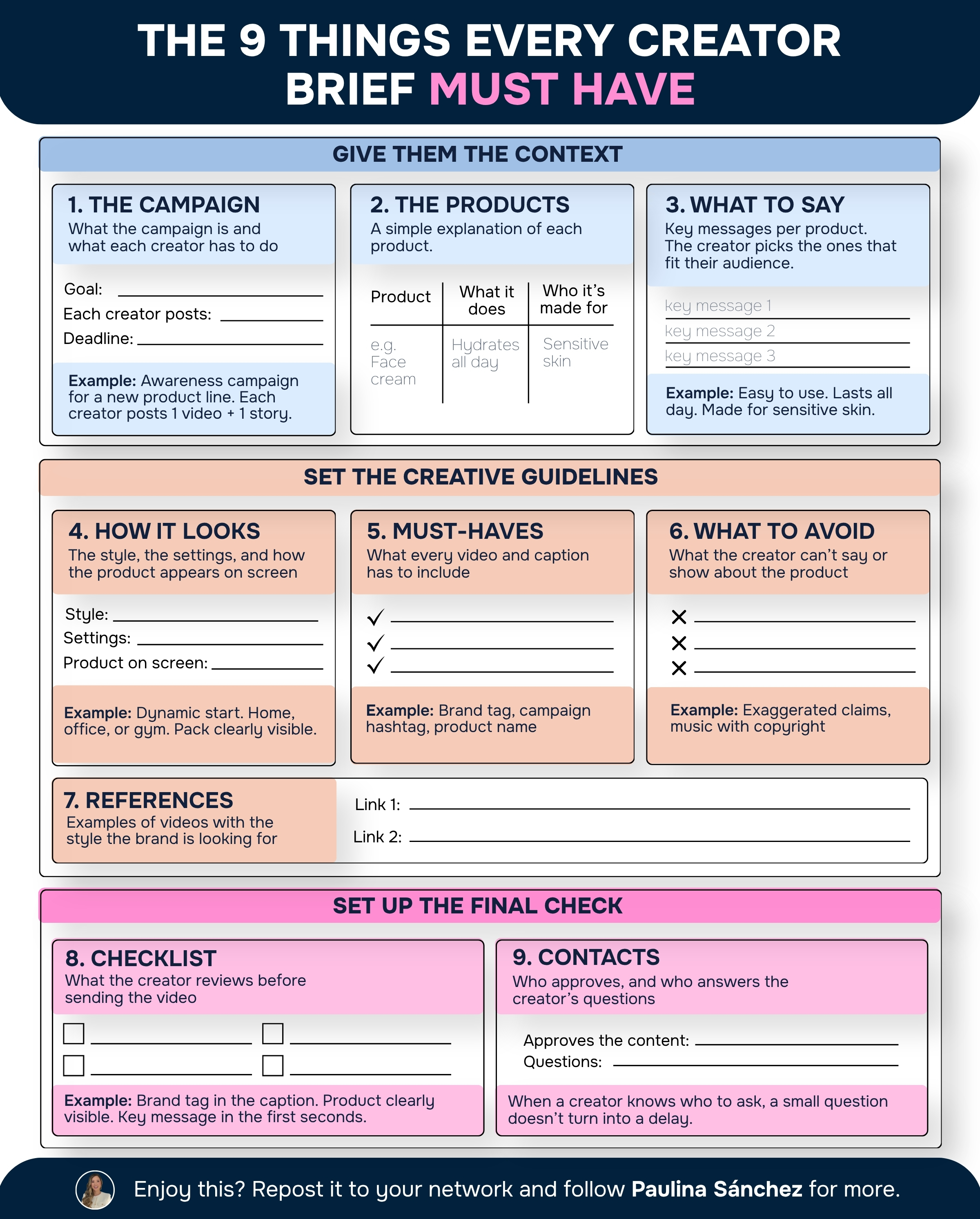
That's why every brief needs a second version: a creator toolkit, the same campaign written for the person behind the camera.
Here's what goes in it:
1. The campaign
↳ A short summary of the campaign and what the brand needs from each creator.
2. The products
↳ A simple explanation of each product: what it does and who it's made for.
3. What to say
↳ The key messages for each product, so the creator can choose the ones that fit their audience.
4. How it should look
↳ The style of the video, the kind of settings that fit the brand, and how the product should appear on screen.
The key is balance: the brand guides what to say, and trusts the creator on how to say it. They know their audience better than anyone.
5. The must-haves
↳ What every video and caption has to include, like the brand tag and the product name.
They're the few things that can't move, so they need to be clear before anyone starts filming.
6. What to avoid
↳ What the creator can't say or show about the product.
7. References
↳ Examples of videos with the style the brand is looking for.
8. Checklist
↳ A short list the creator uses to review their video before sending it.
9. Contacts
↳ Who approves the content and who the creator can write to with questions. When a creator knows who to ask, a small question doesn't turn into a delay.
The brand sets the message and the limits. The creator decides how to tell it.
When both are clear before filming, the video comes back sounding like the creator and feeling like your brand.
Enjoy this?
Follow me on LinkedIn